.png?width=500&height=91&name=CG-Logo-Blue%20(1).png)
Users can flag content they find inappropriate. Each flag creates a report that you can review, comment on, and act on from the Content Moderation page.
Who can do this: Platform admins.
Opening Content Moderation
If you aren't already in Admin mode, switch to Admin mode.
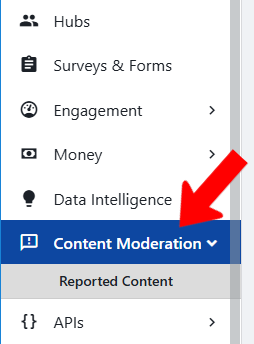
Click Content Moderation in the left menu.
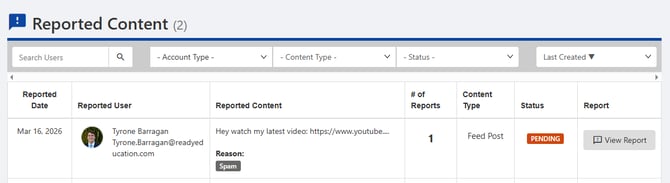
The page lists every submitted content report. Reports that haven't been reviewed yet show the status Pending. Each report shows the reported user, a snippet of the content, the report reason, and the number of reports it has received. Report reasons are set up in Custom Values.
Reviewing a report
Click View Report next to the report you want to review.
The View Report popup shows more detail about the report, including the report reason.
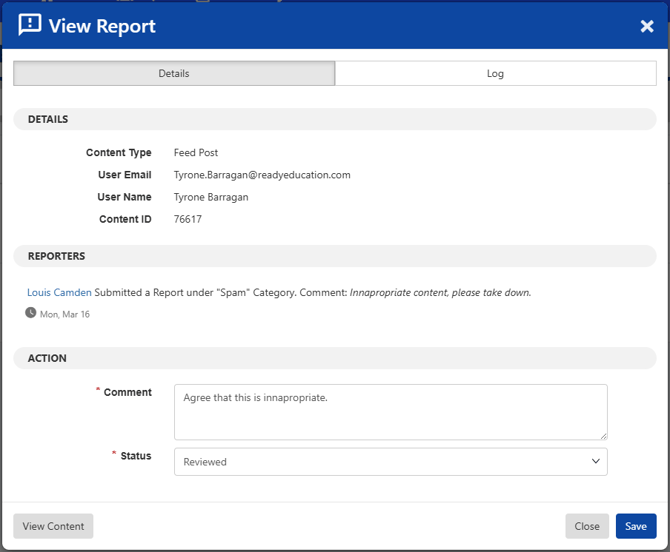
Enter a comment about your review.
Set the status to On Hold or Reviewed.
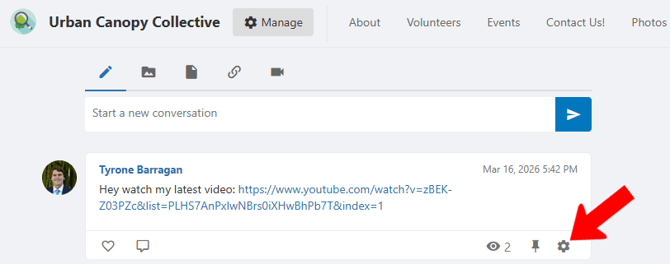
To edit or delete the reported content, click View Content. The content opens in a new tab, where you can edit or delete it.
What happens to reported content
Reporting content doesn't hide or remove it, with one exception. Flagged content stays visible exactly as it was posted, no matter how many reports it receives, until an admin reviews the report and decides what to do.
ℹ️ Note: Content reported for Child Safety is the exception. It's hidden immediately and stays hidden until an admin reviews it.
Child Safety is also the only report reason you can't rename or delete. The Apple App Store and Google Play both require apps with user-generated content to offer a way to report child exploitation and endangerment. Removing or changing this reason would put your instance out of compliance and could lead to the app being rejected or removed from the stores. You can change every other report reason. Learn how to configure report reasons.