.png?width=500&height=91&name=CG-Logo-Blue%20(1).png)
Your platform admin determines whether group events require approval.
Note: Admins also determine how event changes affect the approval process.
Events that require approval will not appear on the calendar, nor will users be able to access it, until approval is granted.
If your events require approval, then during the event creation process you will see Create Event and Proceed to Approval Form.

The approval form is configured by your platform admin. Fill out the fields.
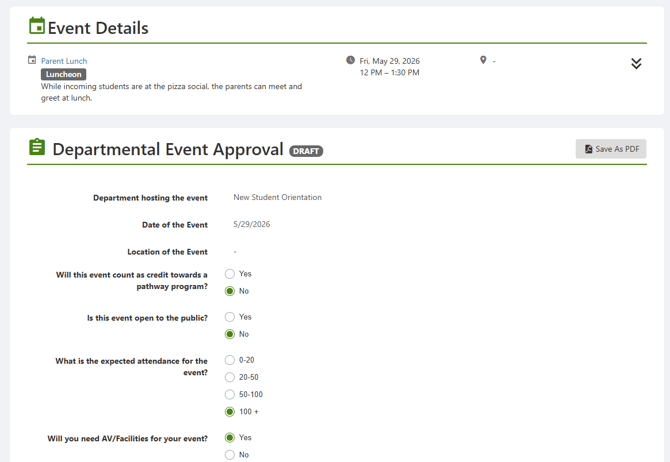
When finished, you can save the form as a draft and return to it later, or submit the form and await approval.

If you save the form as a draft, it will be listed in My Surveys and Forms. The form can also be accessed from the event itself, which will be in the Drafts list.
After you submit for approval, the event will move to Upcoming Events with a Pending Approval status.
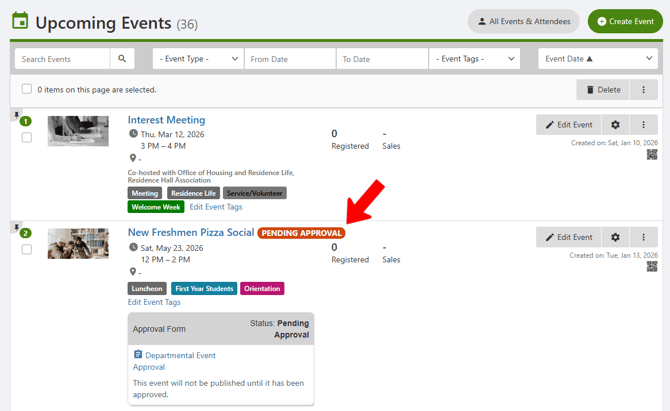
As the event moves through the approval process, if the status update to Requires Modification, you will need to edit and resubmit the approval form.
Event Approval after Event Changes
Events that are awaiting approval, or are already approved, can still be edited if needed. These edits can only be performed by:
- The officer who submitted the approval form
- An officer of the host Group with the officer permission to "Edit Events."
- An admin who is also an officer of the group hosting the approval form
Find the event in the Upcoming Events list, and click Edit Event.

Make the edits then continue to the approval form.
Changes made to the following event fields will always reset the approval process:
- Event name
- Description
- Date and / or time
- Location
Your admin may also require approval reset after any changes to any fields, or after changes to other specific fields.
While re-approval is pending, the event is removed from the calendar until re-approval is complete.
Note: Admins who are also officers of the group hosting the approval form can make any change to an approved event without resetting the approval process.