.png?width=500&height=91&name=CG-Logo-Blue%20(1).png)
The Generate Report feature downloads a CSV file of your group's membership details, so you can work with the list outside CampusGroups (CG) - in a spreadsheet, a mail merge, or your own records.
Who can do this: Group officers.
Start by managing your group and opening the Members list. Optionally, apply a filter or search first so the report covers only the members you want.
Select the members to include, then click Generate Report.
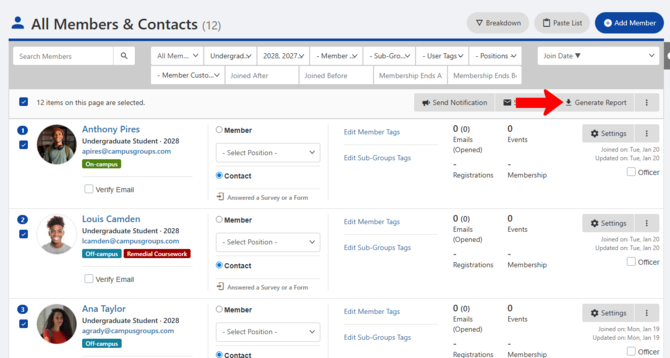
CG generates the file and downloads it to your computer. The CSV includes membership details for the members you selected, such as ID, email, tags, source type (how the member was added to the group), and sign-up date.
ℹ️ Note: The report contains member contact information, so store and share it in line with your institution's data-handling policies.