.png?width=500&height=91&name=CG-Logo-Blue%20(1).png)
The Co-Curricular Transcript (CCT) Co-Curricular Transcript provides a single-pane view into all student achievements: groups, badges, checklists, service hours, non-platform experiences, languages, interests, and more.
Admins can customize the CCT appearance in the Co-Curricular Transcript tab of the General Settings.
Note: Users can view their CCT via the My Activity hub menu item My Activity (My Activity / My Involvement/ My CCT).
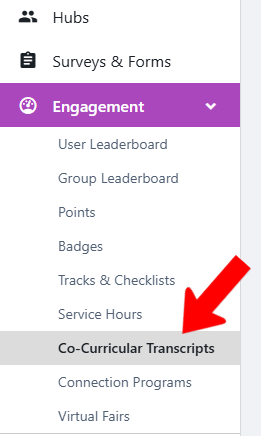
To view CCTs platform-wide, switch to Admin mode XRF if needed. Open Engagement on the left, and choose Co-Curricular Transcripts.
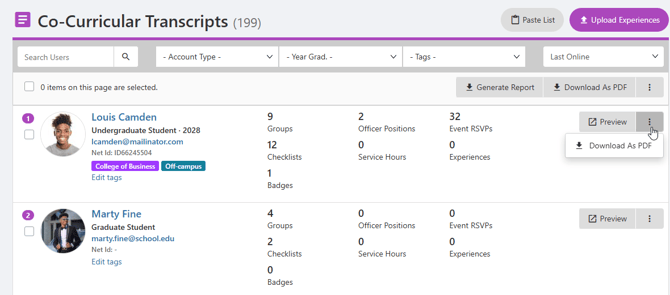
The Co-Curricular Transcripts list includes each platform user, and can be searched and filtered Co-Curricular Transcript. Each transcript can be previewed in a separate tab, or downloaded as a PDF. There is an option to Upload Experiences, to add non-platform activities.